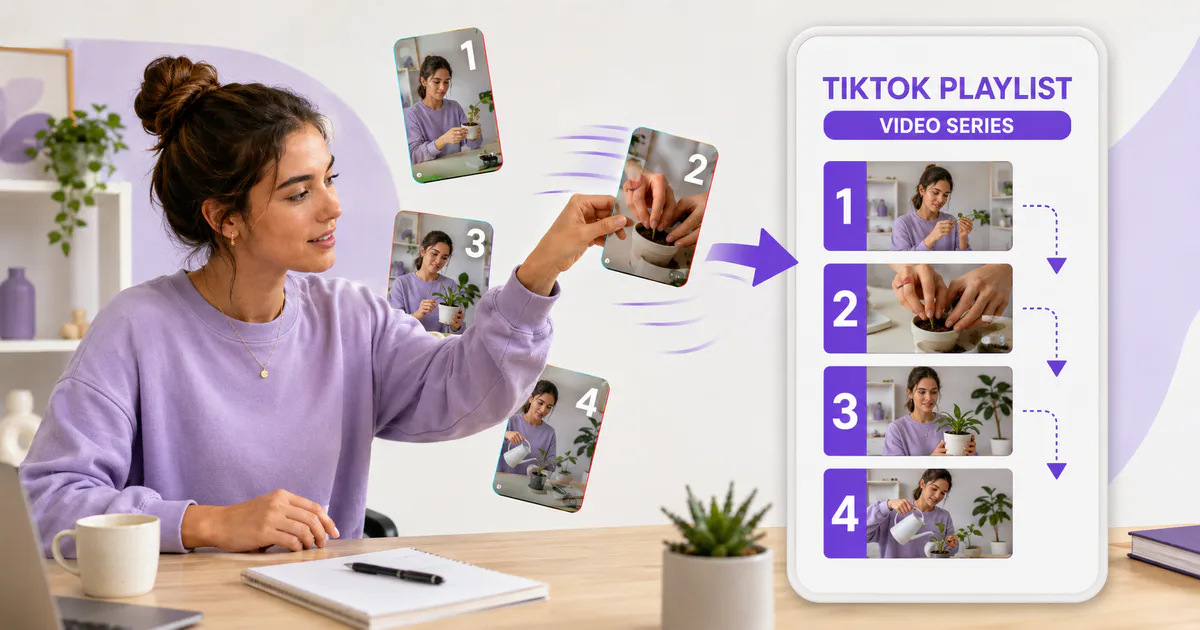
If your TikTok profile contains tutorials, recurring stories or several videos about the same subject, a playlist can make the sequence much easier to follow. You can create one from your profile—or add a video while preparing a post—provided the feature is available on your account.
The setup itself is quick. The useful part is deciding what belongs together and which video should play first.
What will you learn in this guide?
- What TikTok Creator Playlists do
- How to check whether your account has access
- How to create a playlist from your profile
- How to add a video before publishing
- How to choose a clear name and viewing order
- What to check when the playlist option is missing
What is a TikTok playlist?
A TikTok Creator Playlist is a public group of related posts arranged so viewers can watch them as a series. TikTok describes the feature as a way for creators to categorize public content and make related videos easier to watch in sequence.
That makes playlists different from private collections. A creator playlist organizes your own public posts for visitors; a collection helps an individual user privately save videos they want to revisit.
TikTok also states that Creator Playlists aren’t available everywhere. Its current help page doesn’t give a universal follower threshold, so be cautious with guides that promise access at one exact follower count. Availability can differ by account or region.
Why should you organize videos into playlists?
Playlists reduce searching. Someone who discovers part four of a tutorial can open the series instead of scrolling through every post on your profile to find parts one, two and three.
They’re most useful when order matters or when several posts answer connected questions. Good candidates include:
- A multi-part tutorial
- A product setup sequence
- A recurring question-and-answer series
- A travel diary arranged by day
- A recipe broken into techniques
- A story told across several posts
A playlist doesn’t guarantee more reach, longer watch time or extra followers. It simply creates a clearer path through content you’ve already published.
What do you need before creating a playlist?
First, check whether the feature appears on your account. Open TikTok, go to Profile, look at the posts tab and check for Manage playlists. TikTok’s labels can change slightly between app versions, but the playlist control should be visible in that area if you have access.
You’ll also need public posts to add. Private content can’t be placed in a public Creator Playlist, and TikTok says each post can belong to only one playlist at a time.
Before you tap anything, decide what the playlist is for. Finish this sentence:
This playlist helps a viewer watch ______ in the right order.
If the blank needs three unrelated ideas, the playlist is probably too broad.
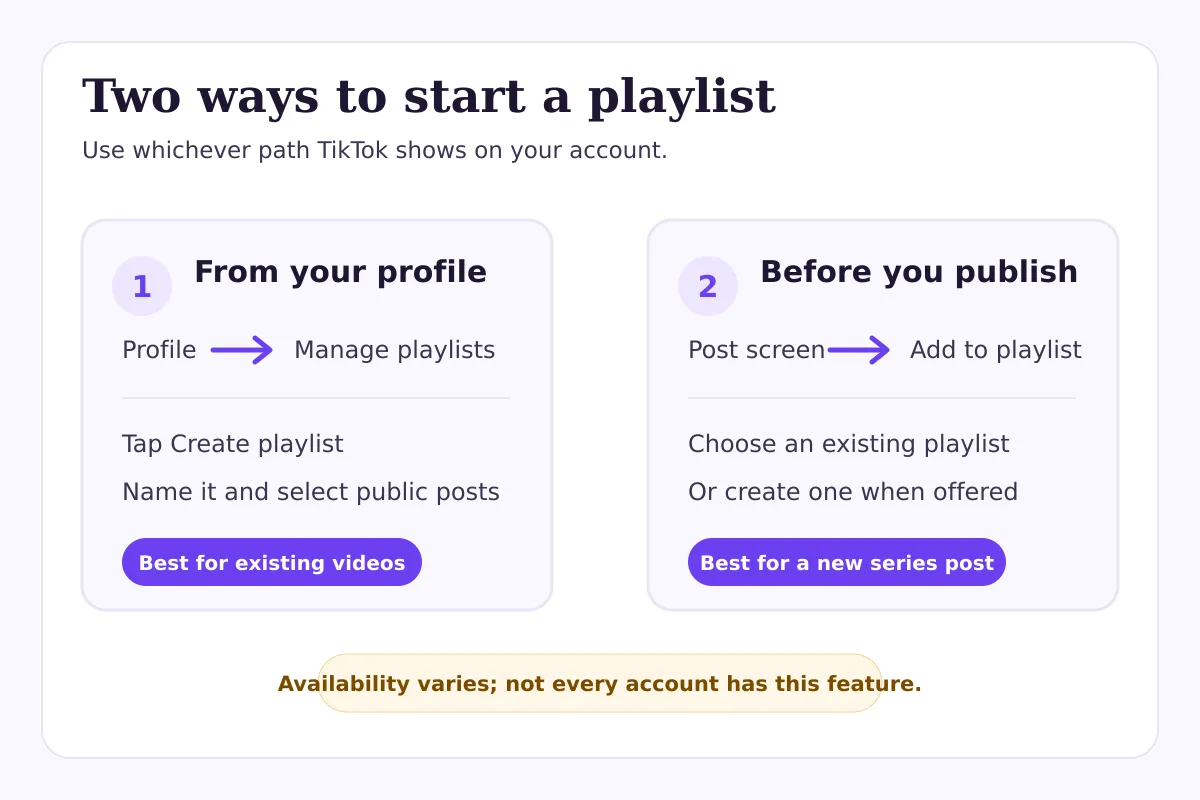
How do you make a playlist from your TikTok profile?
TikTok’s current process is straightforward:
- Open the TikTok app and tap Profile.
- In the posts tab, tap Manage playlists.
- Tap Create playlist.
- Follow the on-screen steps to name the playlist, select eligible public posts and arrange them.
Use a name that tells a new visitor what they’ll get. “Editing Tips” is clearer than “Things I Like,” while “Beginner Espresso: 5 Steps” is clearer still.
Don’t treat the playlist name like a caption. Keep it short enough to scan on a profile and specific enough to distinguish it from your other series.
How do you add a TikTok video to a playlist before posting?
If you already have playlist access, TikTok may let you assign a video during publishing. On the post screen, tap Add to playlist, choose an existing playlist or create a new one when that option is offered, then finish publishing normally.
This is useful because it turns playlist maintenance into part of the posting routine. You won’t need to remember to organize the video later.
Still, check the finished playlist after the post goes live. A new video may appear in a position that makes sense chronologically but not instructionally. If it’s a summary or update, it might work better near the end than at the beginning.
How should you order videos inside a playlist?
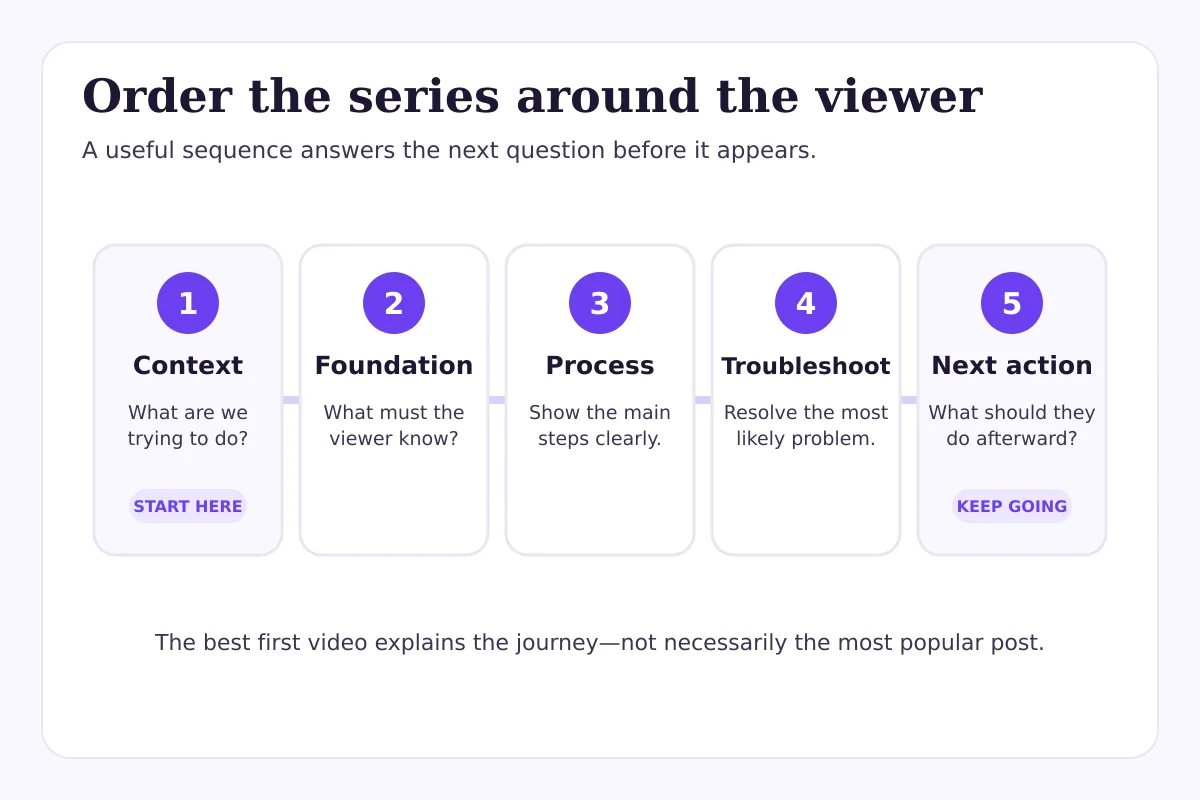
Start with the video that gives the viewer the best orientation—not automatically the post with the most views. A strong first video explains the problem, shows the expected outcome and makes the next step obvious.
For an educational series, a useful order is:
- Context: what the viewer is trying to do
- Foundation: the first essential concept
- Process: the main steps
- Troubleshooting: the common failure point
- Next action: what to try after finishing
Here’s a hypothetical example. Imagine a bakery with seven short videos about making sourdough. A practical playlist might begin with “What you need,” continue through starter care and mixing, then end with baking and troubleshooting. Ordering the posts by their original publication dates could put “Why your loaf stayed flat” before the viewer has learned how to mix the dough.
The right sequence depends on the viewer’s question, not your upload history.
How do you add, remove or reorder posts later?
Open Profile, tap Manage playlists, choose the playlist and use the available editing controls. TikTok’s help documentation says creators can add posts, remove posts, rename a playlist and reorder its contents.
If a video is already in another playlist, remove it there before trying to move it. Remember: one post can sit in only one Creator Playlist at a time.
Review active playlists whenever a series changes. Remove outdated instructions, move a new introduction to the front and rename a playlist if its scope has evolved. A neat series is more helpful than a large one.
What if “Manage playlists” isn’t showing?
The most important answer is simple: TikTok says the feature isn’t currently available everywhere. A missing button doesn’t automatically mean your account has a penalty or technical fault.
Check these points before troubleshooting further:
- Update TikTok through your device’s official app store.
- Confirm that you’re looking at your profile’s posts tab.
- Check whether the post you want to organize is public.
- Look for playlist controls on both your profile and the publishing screen.
- Restart the app and check again after the update finishes.
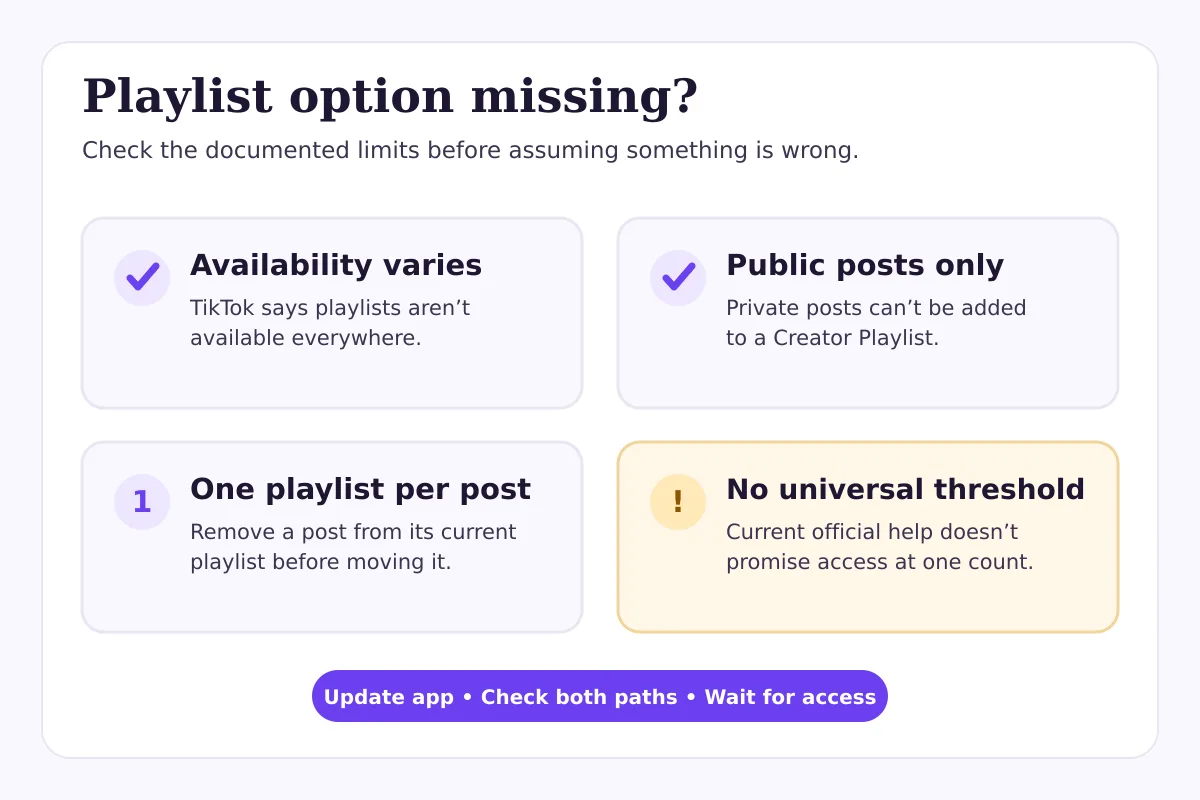
Avoid relying on unofficial follower thresholds as a promise. Some third-party tutorials still repeat old access rules, but TikTok’s current public help page only confirms limited availability.
If other account features are also missing or TikTok shows a warning, review the notice rather than assuming playlists caused it. Our guide to TikTok For You feed eligibility explains how to distinguish a post-level restriction from a wider account issue.
What usually goes wrong with TikTok playlists?
The first mistake is making a catch-all playlist. “My Videos” doesn’t help because the profile already contains your videos. A playlist should narrow the choice.
The second is choosing the strongest standalone post as the opening when it doesn’t introduce the series. Popularity and sequence play different roles.
Another common problem is promising an order in the title but not delivering it. If the playlist says “Start Here,” viewers shouldn’t land on part six. Likewise, don’t label unrelated posts as a course just because they share a broad topic.
Finally, creators sometimes build the playlist and forget the content plan behind it. Use TikTok Creator Search Insights to find real questions, then decide whether several closely connected answers deserve a series.
What is a simple playlist publishing checklist?
Before you finish, confirm that:
- The playlist covers one recognizable topic
- Its name tells viewers what to expect
- Every included post is public
- No video is trapped in a different playlist
- The first post introduces the sequence
- The order still makes sense to someone new
- Outdated advice has been removed or clearly updated
- Captions identify numbered parts consistently when order matters
You don’t need a playlist for every content category. Use one when it removes friction for the viewer.
Can FastSocialz help with a TikTok content series?
FastSocialz offers a managed TikTok growth service that works around your public profile and doesn’t require your TikTok password. It can support visibility around an active content plan, but it can’t unlock Creator Playlists, guarantee recommendation, or replace the work of creating a useful series.
Build the playlist for clarity first. Promotion only helps when the profile gives interested visitors somewhere relevant to go next.
Final thoughts
A good TikTok playlist answers two questions immediately: “What is this series about?” and “Where should I start?” If yours does that, it’s doing its job.
Create the smallest useful series, put the orientation video first and revisit the order as new posts arrive. The feature is simple; the editorial decision behind it is what makes the playlist worth opening.
Official sources
Once a series is organized, the next question is usually whether to pay for extra distribution. Our comparison of paid Promote campaigns and organic TikTok publishing sets out when each one is the sensible choice.
Structured support, no account access
Where a growth service fits on TikTok
Content and profile conversion come first, and no service changes that. A growth service cannot repair a vague bio, an audience that was never yours, or a post that gives viewers no reason to follow.
What it can do is handle the part most people never get around to: putting your profile in front of the right audience, consistently, while you concentrate on the content. FastSocialz builds campaigns by hand and runs them from your public profile link, so it never asks for your TikTok password and never logs in as you.
Explore TikTok Growth →No growth service can promise that a given number of views will produce a given number of followers.Questions, answered plainly
Frequently asked questions
How many followers do you need to make a playlist on TikTok?
TikTok’s current public help page doesn’t state one universal follower requirement. It says Creator Playlists aren’t available everywhere, so access may vary by account or region.
Can one TikTok video appear in two playlists?
No. TikTok says a post can be in only one playlist at a time. Remove it from its current playlist before adding it to another.
Can private TikTok videos go in a Creator Playlist?
No. Creator Playlists are designed for public posts. Change a post’s visibility only if making it public is appropriate for that content.
Can you create a playlist before publishing a video?
If your account has access, the publishing screen may show Add to playlist. You can choose an existing playlist or create one when TikTok offers that option.
Do TikTok playlists increase views?
They can make related posts easier to navigate, but they don’t guarantee views, reach, engagement or followers. Treat playlists as a viewer-experience tool, not a ranking shortcut.
Keep reading
Related guides
How to Add Chapters to YouTube Videos
A practical guide to planning, formatting, publishing, and checking YouTube chapters without turning your description into a mess.
YouTube Impressions Up but CTR Down? 7 Checks Before You Change Your Thumbnail
A falling click-through rate is not automatically bad when YouTube is showing your video to more people. Use these seven checks before changing the thumbnail.
YouTube Dynamic Thumbnails vs A/B Testing: What Creators Should Know
YouTube has announced dynamic thumbnails and video-cut testing, but its existing A/B tool works differently. Here is what each option tests and what creators can do now.