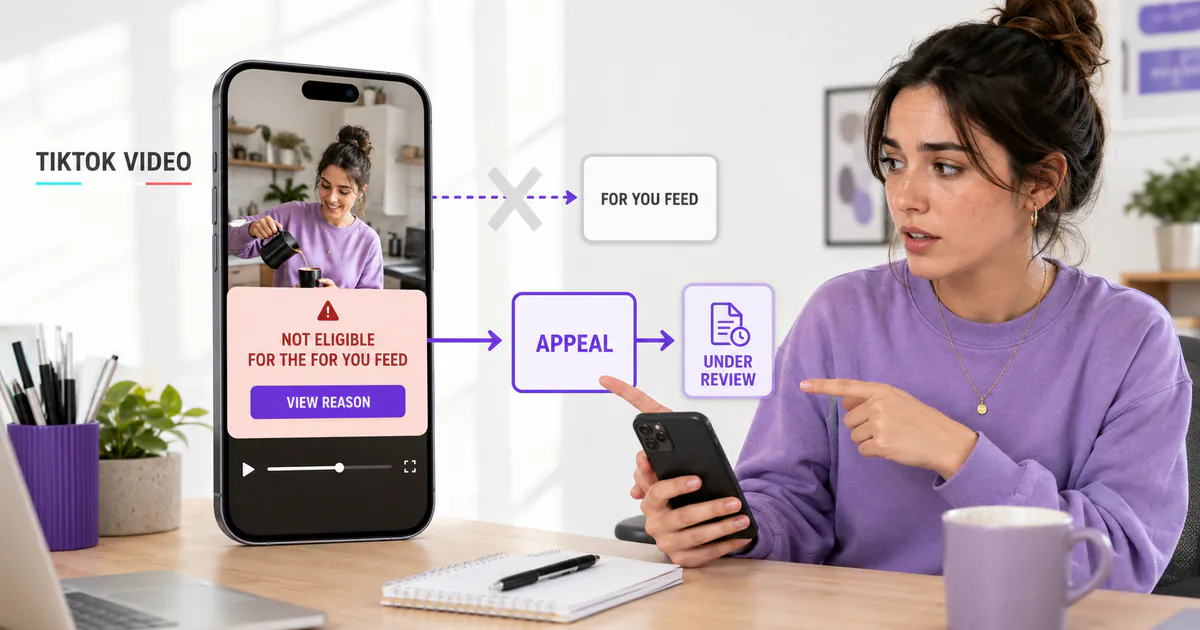
If TikTok says a video isn’t eligible for the For You feed, the post may remain visible on your profile while TikTok stops recommending it in that feed. Open the post’s analytics or More insights to read the stated reason. If the decision looks wrong, use the appeal option attached to that notice instead of deleting and reposting immediately.
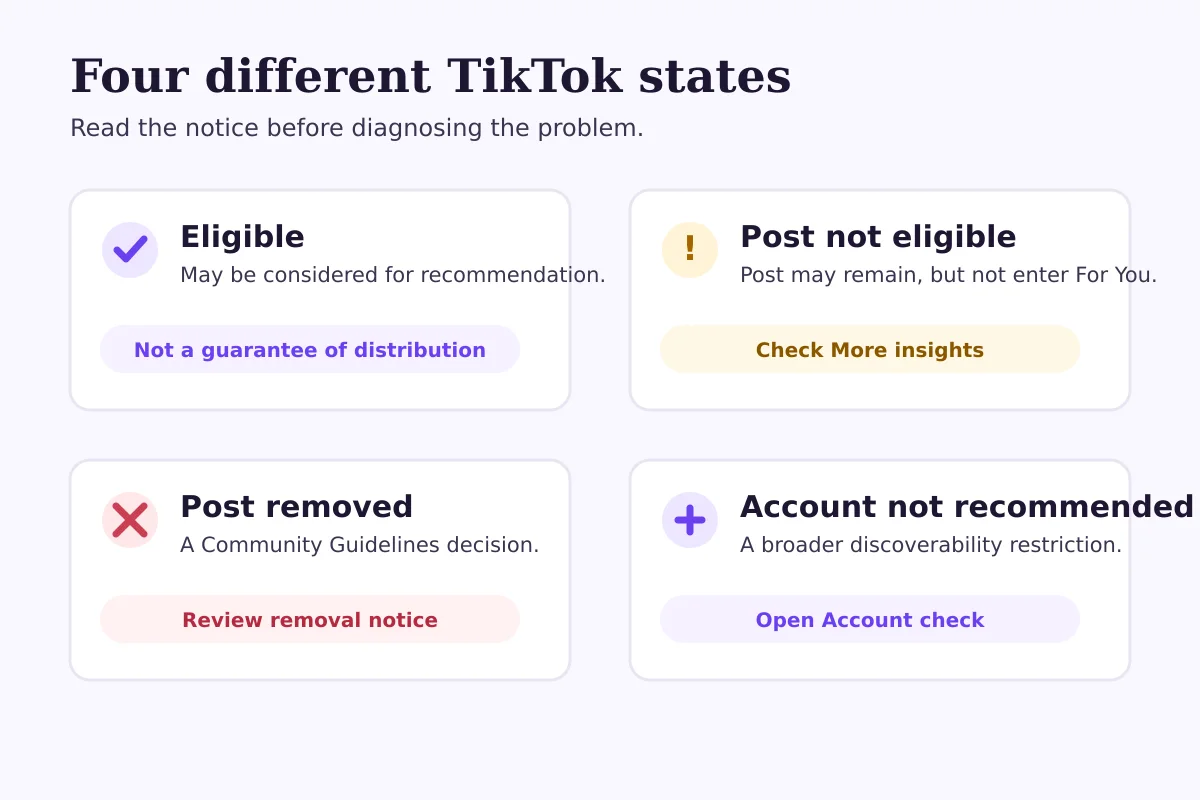
This is a distribution decision, not automatically an account ban. It also isn’t proof of a hidden “shadowban.” The useful next step is to identify whether TikTok restricted one post, removed it, age-restricted it or marked the wider account as not recommended.
What does “not eligible for the For You feed” mean?
TikTok says it may keep some content off the For You feed even when that content is allowed to remain on the platform. The reason is that recommendation surfaces are designed for a broad audience and use a separate set of eligibility standards.
That distinction matters. “Allowed on TikTok” and “recommended to new viewers” aren’t the same decision.
| Notice or symptom | What it usually indicates | What to check first |
|---|---|---|
| Post is ineligible for the For You feed | A recommendation restriction on that post | The reason shown in More insights |
| Post was removed | TikTok found a Community Guidelines violation | The removal notice and appeal option |
| Account is not being recommended | Repeated unsuitable posts may have affected account discoverability | Inbox/profile notice and Account check |
| Views are simply lower | No restriction is proven | Analytics, traffic source and comparable posts |
TikTok also says a post that isn’t suitable for a broad audience may be harder to find in search. That doesn’t mean every low-view post has an eligibility problem. If there’s no notice, don’t diagnose a policy restriction from performance alone.
Where can you see why TikTok restricted a post?
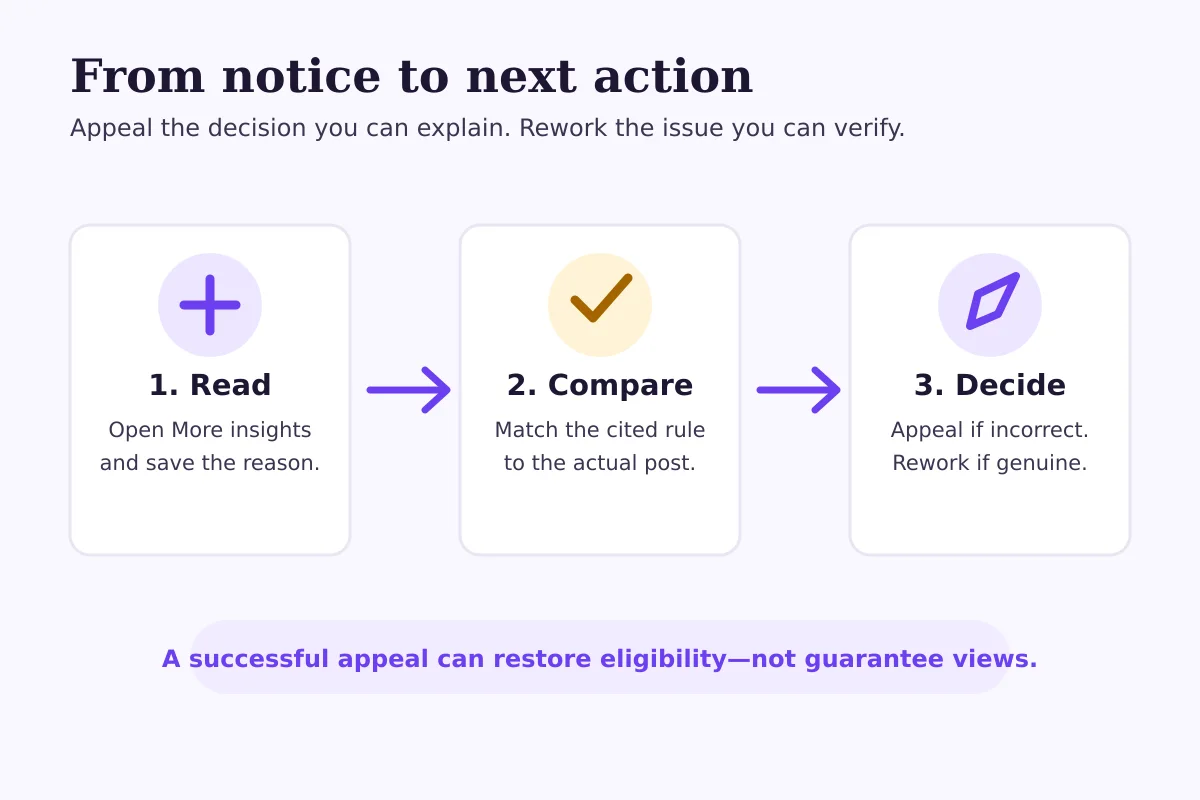
Start with the affected post, not a third-party “shadowban checker.” TikTok’s official appeal instructions direct creators to open the ineligible post and tap More insights at the bottom. The notice should explain why the post was excluded and provide the appeal route when one is available.
The wording and menu position can vary by app version or region, so use the notice attached to the actual post as the authority.
Also review your wider account status:
- Tap Profile.
- Open the Menu.
- Select Settings and privacy.
- Tap Support, then Safety Center.
- Open the available account-status or account-check information.
Account status helps separate a single-post issue from something affecting the profile more broadly. It’s a diagnostic screen, not a promise that every distribution concern will show one simple cause.
Why can a video be allowed but not recommended?
The For You feed reaches people who may not know the creator and didn’t ask to see the post. TikTok therefore applies recommendation eligibility standards in addition to its general Community Guidelines.
TikTok’s public guidance gives examples of content that can be excluded from recommendation without necessarily being removed. The exact reason shown on your post matters more than a generic online list. Review the cited policy category, then compare it with what is actually visible or audible in the video.
Avoid the tempting shortcut of changing several things at once. If the notice mentions originality, inspect whether the video contains another platform’s watermark, a large amount of reused footage or an edit that doesn’t add clear new value. If it points to mature or sensitive material, examine the frames, text, audio and caption together. Context that feels obvious to you may not be obvious in a short clip.
Don’t assume “high quality” only means resolution. A technically sharp 4K upload can still raise a recommendation issue if its substance, source or presentation conflicts with the stated standard.
How do you appeal an ineligible TikTok video?
Appeal when you can explain why the specific decision appears incorrect. TikTok’s current help instructions say to open the affected post, tap More insights, open the ineligibility notification and follow the on-screen appeal steps.
Before submitting, save a copy of:
- the original video;
- the caption and on-screen text;
- the eligibility notice and stated reason;
- any licences or source files that establish ownership;
- a short explanation tied directly to the cited rule.
Keep the appeal factual. “This is unfair” gives a reviewer little to evaluate. A stronger explanation identifies the disputed point: the footage is original, the educational context is visible, the licensed material is documented or the flagged element doesn’t appear in the post.
An appeal is a request for review, not a guaranteed reversal. Don’t promise yourself a result or build a content calendar around a fixed response time unless TikTok gives one in the app.
Should you delete and repost the video?
Usually, not before you understand the notice. Deleting removes the version connected to the decision and can make your own review harder. Reposting the same material without resolving the cited issue may reproduce the same outcome.
There are three cleaner options:
- Appeal the existing decision when you believe TikTok made a mistake.
- Edit the concept substantially when the reason points to a real problem.
- Leave the post alone and move forward when the video isn’t important enough to rework.
Here’s a hypothetical example. Imagine a fitness coach posts a reaction video using a long clip from another creator, with only a short introduction added. If the notice raises an originality concern, cropping the same clip and reposting it isn’t a meaningful fix. The coach could appeal if they own or licensed the footage. Otherwise, a genuinely new version should rely on their own demonstration and commentary.
Now suppose a museum posts an educational clip containing a brief historical image that TikTok classifies as sensitive. That’s also hypothetical. The museum might appeal by explaining the context, but it should still review whether the opening frame, caption and on-screen explanation make that context clear. Educational intent doesn’t guarantee recommendation eligibility.
What if TikTok says your whole account isn’t being recommended?
TikTok says accounts that repeatedly post content unsuitable for the For You feed may stop appearing there and become harder to find in search. TikTok may notify the account through the inbox or profile.
That is broader than one video. Review every active notice and recent post rather than treating the newest upload as the only cause. TikTok’s guidance says an account may be restored to good standing automatically depending on how much unsuitable content it has, and account-level decisions may also be appealable.
Don’t respond by deleting your entire library. First document the notices, identify repeated policy categories and appeal decisions you can support. Then adjust new posts so the same issue isn’t repeated while reviews are pending.
What should you check before posting again?
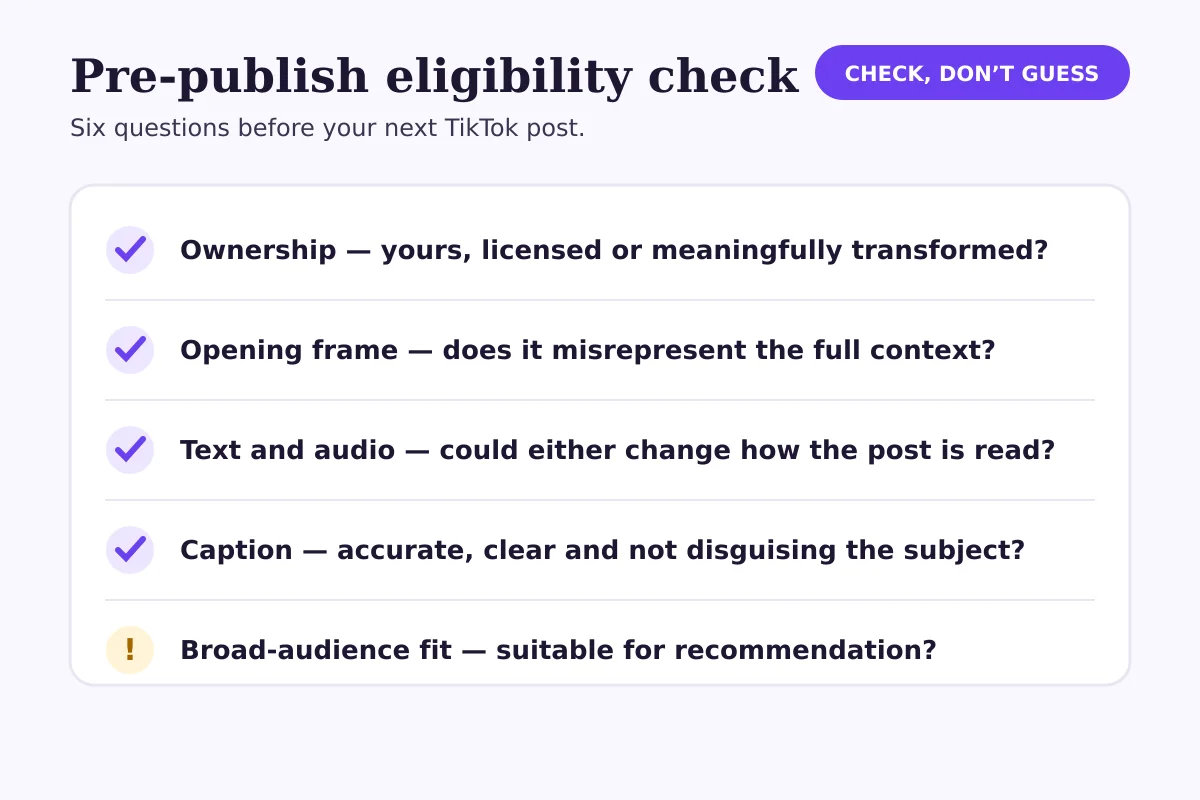
Use a short pre-publish review:
- Ownership: Is the footage yours, licensed or transformed with meaningful original contribution?
- Opening frame: Could the first second create a different impression from the full context?
- On-screen text: Does any wording imply harm, deception or an unsupported claim?
- Audio: Could a spoken line or sound change how the visuals are interpreted?
- Caption and hashtags: Do they accurately describe the video without trying to disguise its subject?
- Audience fit: Is the post suitable for broad recommendation, or would a narrower treatment be more responsible?
This checklist can reduce avoidable mistakes, but it can’t guarantee eligibility or distribution. TikTok evaluates posts under its own standards and systems.
For topic planning after the policy issue is resolved, the FastSocialz guide to TikTok Creator Search Insights can help you identify genuine search gaps. Use it for ideas—not as a workaround for an eligibility restriction. The TikTok article hub will collect the rest of this topic cluster as it develops.
How should you judge performance after an appeal?
Separate the policy outcome from the performance outcome.
If TikTok restores eligibility, that means the post may be considered for recommendation again. It does not mean the video will receive a particular number of views. Recommendation still depends on viewer signals, content relevance and other factors TikTok describes in its recommendation guidance.
Compare the post with similar content over the same period. Look at traffic sources, viewer response and whether the post reaches people beyond existing followers. Don’t use one reinstated video to declare that the account is “fixed.”
Where does FastSocialz fit?
Eligibility comes first. The FastSocialz TikTok Growth service may support discovery around an active profile, but it can’t overturn TikTok moderation decisions or guarantee followers, views, reach, engagement, ranking or sales.
FastSocialz doesn’t require your TikTok password. Even so, no external growth service is a substitute for policy-compliant content, a clear profile and a sensible publishing process. The How FastSocialz works page explains the service model and its limits.
The practical takeaway
Treat the notice as a policy diagnosis, not a verdict on your entire account. Read the specific reason, preserve the evidence, appeal when you can make a clear factual case and change the content when the issue is genuine.
Most importantly, keep recommendation eligibility separate from performance. A post can be eligible and still receive limited distribution. It can also remain on your profile while being excluded from the For You feed. Those are different states, and each calls for a different response.
Official sources
- TikTok: How TikTok recommends content
- TikTok: Content violations and bans
- TikTok: Why is my account not being recommended?
- TikTok: Your account status
Spending on distribution cannot substitute for an eligibility review, and the two problems need different fixes — here is how paid promotion and organic reach actually differ.
Structured support, no account access
Where a growth service fits on TikTok
Content and profile conversion come first, and no service changes that. A growth service cannot repair a vague bio, an audience that was never yours, or a post that gives viewers no reason to follow.
What it can do is handle the part most people never get around to: putting your profile in front of the right audience, consistently, while you concentrate on the content. FastSocialz builds campaigns by hand and runs them from your public profile link, so it never asks for your TikTok password and never logs in as you.
Explore TikTok Growth →No growth service can promise that a given number of views will produce a given number of followers.Questions, answered plainly
Frequently asked questions
Is “not eligible for the For You feed” the same as a shadowban?
No. It is a specific recommendation decision TikTok displays for a post. Shadowban is an informal term and should not replace the reason TikTok actually provides.
Can people still see an ineligible TikTok video?
The post may remain accessible on your profile even when it is not recommended in the For You feed. Other restrictions may also affect visibility, so read the exact notice.
Does deleting an ineligible video remove the account restriction?
Deleting a post does not prove that a wider account issue is resolved. Check the stated reason, account status and appeal options first.
How long does a TikTok appeal take?
TikTok does not provide one universal review time in the cited guidance. Follow the status shown in the app.
Will a successful appeal restore the video’s views?
It may restore eligibility, but it does not guarantee distribution or recover a particular number of views.
Keep reading
Related guides
How to Add Chapters to YouTube Videos
A practical guide to planning, formatting, publishing, and checking YouTube chapters without turning your description into a mess.
YouTube Impressions Up but CTR Down? 7 Checks Before You Change Your Thumbnail
A falling click-through rate is not automatically bad when YouTube is showing your video to more people. Use these seven checks before changing the thumbnail.
YouTube Dynamic Thumbnails vs A/B Testing: What Creators Should Know
YouTube has announced dynamic thumbnails and video-cut testing, but its existing A/B tool works differently. Here is what each option tests and what creators can do now.