
Facebook Page Insights can give you more numbers than decisions. The useful question isn't “Which post got the biggest total?” It's “What should we repeat, change or test next?”
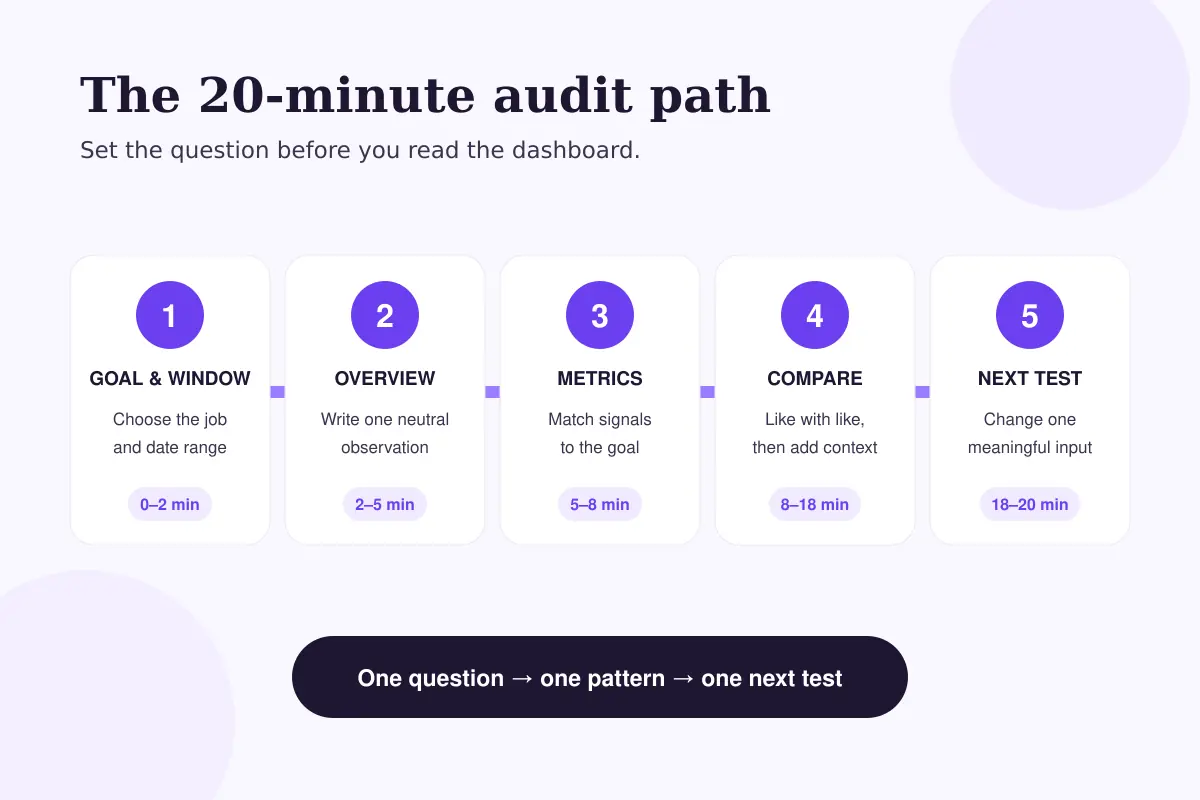
This 20-minute audit turns the Overview, Content and Audience sections in Meta Business Suite into one practical next step. You won't need a complicated spreadsheet, a universal engagement benchmark or a theory about the algorithm. You will need a clear goal, a fair comparison window and a small group of genuinely comparable posts.
Meta says Business Suite Insights can show performance from organic and paid activity, audience information, trends and visual reports. That range is useful, but it also makes careless comparisons easy. A promoted Reel, a routine photo update and a link post sent to an established audience may all be successful for different reasons.
What will you have after 20 minutes?
You should finish with three things: a short description of what changed, evidence from comparable content, and one variable to test in the next publishing cycle.
The audit isn't designed to prove why Facebook distributed a post in a particular way. Page-level data rarely gives you that certainty. It is designed to replace vague reactions with a more disciplined question.
Before you start: choose one job for the audit
Open Meta Business Suite on desktop and select the correct Facebook Page from the account dropdown. Meta's current instructions place the Overview inside Insights in the left menu. If you manage more than one Page, pause here and confirm the Page name; auditing the wrong account is an easy mistake.
Next, write down the job you want Facebook content to do during this review. Keep it narrow:
- make more relevant people aware of the Page;
- start useful conversations around a topic;
- send interested readers to a page on your website;
- help existing customers understand an update; or
- build a repeatable content series.
The job determines what deserves attention. A post created to explain a policy shouldn't be judged only by reactions. A community question shouldn't be judged only by link clicks.
Use one consistent date range. Twenty-eight days is a practical starting point for an active Page, but it isn't a Meta requirement or a universal benchmark. If you publish less often, use a longer window that contains enough similar posts to compare. Save or note the previous equivalent period as context.
Step 1: scan the Overview without choosing a winner
Spend about three minutes in Insights → Overview. Look at the direction of the Page-level trends, not just the largest number on screen.
Ask:
- Did overall exposure move noticeably?
- Did content response move in the same direction?
- Did Page growth or profile activity move with either one?
- Was any paid activity included during one period but not the other?
Write one neutral sentence. For example: “Content exposure rose, but actions stayed broadly flat.” That observation is more useful than “engagement is bad,” because it tells you what to investigate next.
Don't turn the Overview into a verdict. It combines signals from different content and, depending on the view, may include both organic and paid activity. Its job in this audit is to show where the next five minutes should go.
Step 2: separate the metric from the decision
You don't need to track every available metric. Choose the smallest set that answers the Page's current question.
| If you want to understand… | Start with… | Then ask… |
|---|---|---|
| Visibility | Reach, views or impressions shown for that content type | Did more people receive the post, or did some people see it repeatedly? |
| Response | Reactions, comments, shares and other available interactions | What kind of response did the post invite? |
| Traffic | Link clicks and destination activity you can verify | Did the post create qualified visits, not just feed activity? |
| Audience change | Follows, unfollows and audience trends available to the Page | Did the Page attract people connected to the topic? |
| Video attention | The video and retention measures available in the selected view | Where did viewers appear to lose interest? |
Metric names and availability can vary by content type, account and reporting surface. Read the definition shown inside the interface instead of assuming two similar labels mean the same thing.
Meta's own guidance recommends focusing on metrics that matter to your business and exporting data when you need more detailed analysis. For a quick weekly audit, however, a short written record is often enough.
Step 3: compare posts that were trying to do the same job
Move to the Content area and filter to published Facebook content within the same date range. Now build a small comparison set.
Choose posts with similar characteristics:
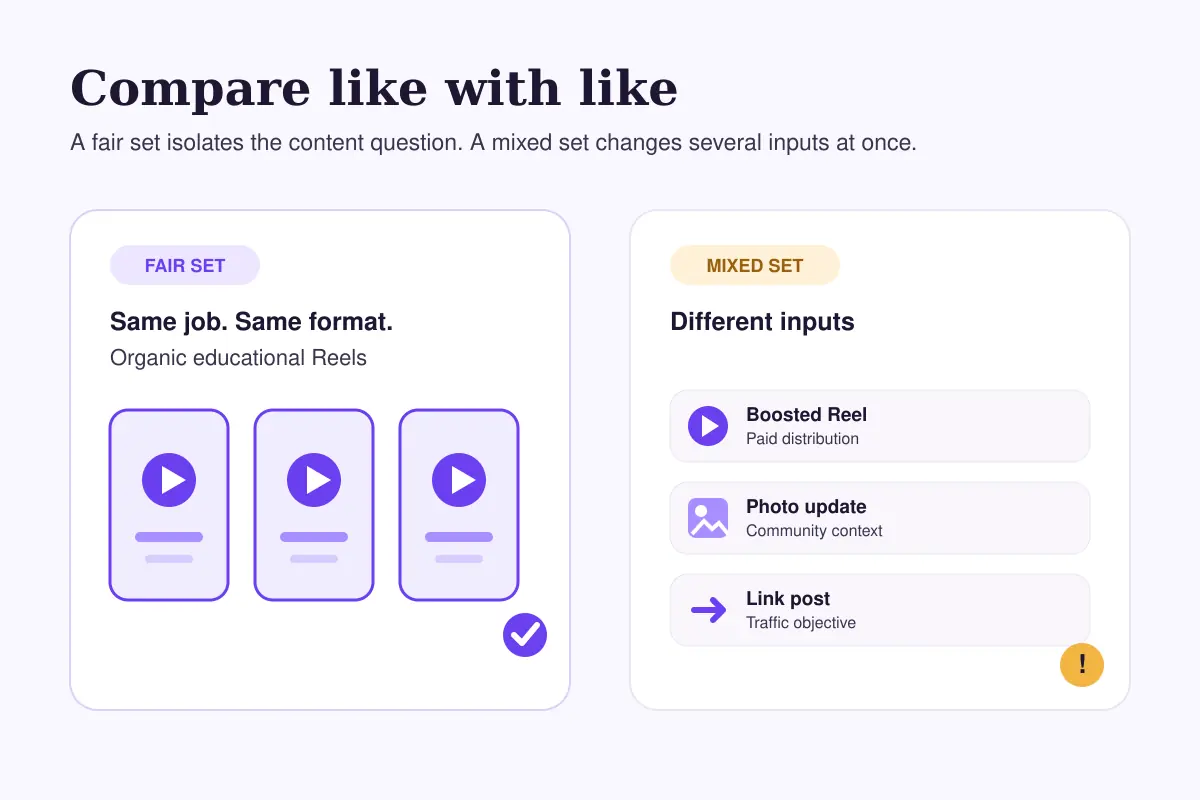
- the same format, such as Reel versus Reel;
- a related topic or audience need;
- a similar publishing purpose;
- broadly comparable length or creative effort; and
- the same delivery type, keeping paid and organic distribution separate.
This is where many audits go wrong. If a boosted post sits beside an organic update, the larger number may tell you more about distribution than creative quality. If a one-minute tutorial is compared with a seven-second clip, the retention pattern answers a different question.
Our earlier guide to Facebook Reels, Stories and feed posts explains why these formats shouldn't be treated as interchangeable. Use that distinction here: compare like with like first, then compare formats by the job each was meant to do.
Step 4: identify one repeatable pattern
Give this section five minutes. Select three to five strong posts and three to five weaker but comparable posts. You're looking for a repeated difference—not a single lucky winner.
Review the opening, topic, format, promise and requested action. Questions worth asking include:
- Does the strong group make the subject clear sooner?
- Does it answer a recognisable customer question?
- Is the visual understandable without reading a long caption first?
- Does the post ask for a response that suits the content?
- Are weak posts clustered around one topic, format or publishing context?
Suppose, hypothetically, a local bakery compares six organic photo posts. Three posts show a finished product with a specific ordering detail, while three use attractive but generic kitchen photos. If the first group earns more useful questions, the lesson isn't “food photos work.” A better hypothesis is that concrete buying context helps this audience know what to do next.
That is specific enough to test. It is not a promise that every product-led post will perform better.
Step 5: check the audience context
Open the Audience section and review the information available to your Page. Meta notes that the Audience tab can show lifetime information for a Facebook Page or Instagram account, while Page insights and professional dashboards may expose additional views.
Use audience data as context, not as a creative brief written in stone. Check whether location, age ranges or active times make your publishing assumptions look unrealistic. If a Page team posts for its own working day while much of the audience is active in another time zone, timing deserves a controlled test.
Meta's engagement guidance suggests checking Insights to see when your audience is most active. Business Suite's scheduling workflow can also surface Active times. Treat those suggestions as a starting point, then compare the results of your own posts.
Don't rebuild the whole calendar because one suggested time looks attractive. Test one or two comparable slots while keeping the topic and format as stable as practical.
Step 6: record what changed outside the content
Before blaming creative, list any operational change that could explain the pattern:
- a paid promotion started or ended;
- the Page changed publishing frequency;
- a seasonal event affected audience attention;
- a link destination changed;
- a collaborator shared the post elsewhere;
- the Page switched formats or content themes; or
- the reporting window includes an unusual campaign.
These notes prevent false lessons. A post may appear unusually strong because it received paid delivery, or unusually weak because the comparison window covers a quiet holiday period.
Here is another hypothetical example. Imagine a consultant publishes two educational videos on the same topic. The newer video gets fewer views, but it was posted without the email and Group distribution used for the earlier one. The first test should probably restore a comparable distribution plan—not replace the entire video strategy.
Step 7: choose one next test
Finish by writing a one-sentence hypothesis:
When we change one specific input, we expect to observe one relevant signal because the comparison showed a repeated pattern.
For example: “When we state the practical outcome in the first line of our next three educational posts, we expect more qualified comments because the clearer openings repeatedly performed better among comparable posts.”
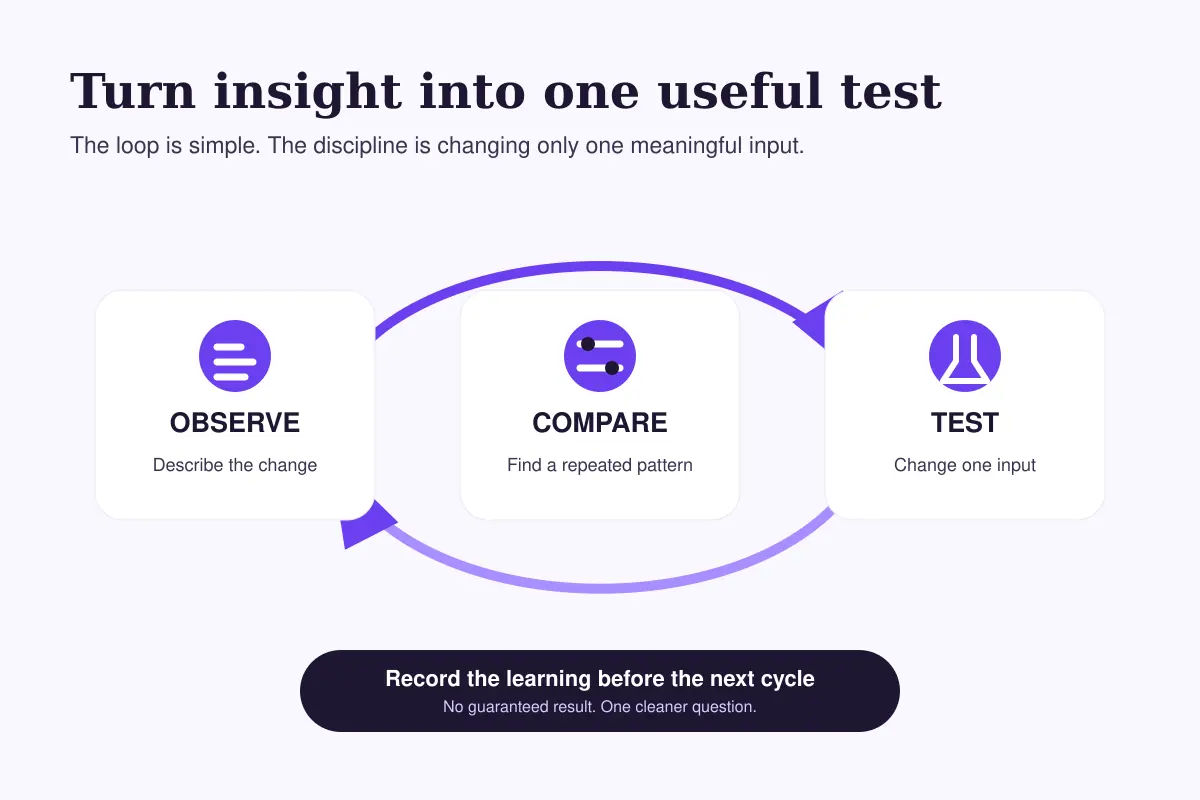
Keep the next test modest. Change the opening, topic framing, publishing slot, call to action or visual structure—not all five at once. If the result changes, you will have a better idea of what may have contributed.
The same comparison discipline applies across platforms. Our Instagram Insights audit uses a similar principle: collect enough comparable evidence before making a strategic change.
What usually goes wrong in a Facebook content audit?
Treating the biggest post as the new baseline
An outlier can be useful, but it may contain an unusual topic, external share, paid push or timing advantage. Study it without assuming the result is immediately repeatable.
Mixing paid and organic distribution
Meta Business Suite can report on organic and paid activity. Label promoted content before judging the creative against posts that received only organic delivery.
Comparing formats by raw totals alone
A Reel, Story and feed post can serve different purposes. Decide what each format was meant to accomplish before comparing its result.
Changing several variables at once
If you change the hook, topic, length, visual and publishing time together, the next post may perform differently without teaching you why.
Looking only for positive evidence
Strong posts show what may be worth repeating. Weak but comparable posts help define the boundary. You need both.
Your 20-minute Facebook audit checklist
- Minute 0–2: Choose the correct Page, date window and business goal.
- Minute 2–5: Write one neutral observation from the Overview.
- Minute 5–8: Select the few metrics connected to that goal.
- Minute 8–13: Compare similar posts and separate paid from organic delivery.
- Minute 13–16: Note one repeated creative or topic pattern.
- Minute 16–18: Check audience context and operational changes.
- Minute 18–20: Record one hypothesis and one controlled next test.
Save the note somewhere your team can revisit. A useful audit creates a trail of decisions; it doesn't just produce a screenshot of a dashboard.
Where FastSocialz fits
An audit helps you improve the content and decisions you control. Distribution support is a separate question. FastSocialz offers a managed Facebook growth service that doesn't require your Facebook password, but it cannot guarantee that a particular post will earn reach, engagement, leads or sales.
Use a service only alongside clear content, accurate measurement and realistic expectations. It shouldn't replace the work of understanding why people choose to pay attention.
Final thought
A dashboard can't make the editorial decision for you. Its value comes from the comparison you build around it.
Use the Overview to locate a change, the Content view to test whether it repeats, the Audience view to add context, and the next publishing cycle to learn one thing at a time. Twenty focused minutes can be enough—provided you leave with a hypothesis rather than a pile of numbers.
Sources
Structured support, no account access
Where a growth service fits on Facebook
Content and profile conversion come first, and no service changes that. A growth service cannot repair a vague bio, an audience that was never yours, or a post that gives viewers no reason to follow.
What it can do is handle the part most people never get around to: putting your profile in front of the right audience, consistently, while you concentrate on the content. FastSocialz builds campaigns by hand and runs them from your public profile link, so it never asks for your Facebook password and never logs in as you.
Explore Facebook Growth →No growth service can promise that a given number of views will produce a given number of followers.Questions, answered plainly
Frequently asked questions
How do I find Facebook Page Insights?
On desktop, open Meta Business Suite, select the correct Facebook Page, then choose Insights from the left menu. You can also access insights from a Page's professional dashboard when that view is available.
What date range should I use for a Facebook content audit?
Use a period containing enough comparable posts to reveal a pattern. Twenty-eight days is a practical starting point for an active Page, but lower-frequency Pages may need a longer window.
Which Facebook metric matters most?
There is no single best metric. Match the metric to the post's purpose: visibility, response, traffic, audience change or video attention. Then compare similar content using the same definition and date range.
Can I compare Facebook Reels with photo posts?
You can compare how well each format served its intended job, but raw totals alone can mislead. Start by comparing Reels with similar Reels and photos with similar photos.
Should I include boosted posts in the audit?
Yes, but label them and analyse paid and organic distribution separately. A promoted post received a different delivery input, so it isn't a fair organic baseline.
How often should I audit Facebook content?
For an active Page, a short weekly review and a more considered monthly audit can work well. Choose a rhythm that produces enough comparable content without encouraging daily overreactions.
Keep reading
Related guides

How to Add Chapters to YouTube Videos
A practical guide to planning, formatting, publishing, and checking YouTube chapters without turning your description into a mess.

YouTube Impressions Up but CTR Down? 7 Checks Before You Change Your Thumbnail
A falling click-through rate is not automatically bad when YouTube is showing your video to more people. Use these seven checks before changing the thumbnail.

YouTube Dynamic Thumbnails vs A/B Testing: What Creators Should Know
YouTube has announced dynamic thumbnails and video-cut testing, but its existing A/B tool works differently. Here is what each option tests and what creators can do now.