# YouTube Video Not Showing in Search? 7 Checks Before You Reupload
A practical seven-check diagnostic for a YouTube video that is published but missing from search results.
- Published: 2026-11-06
- Author: FastSocialz Editorial Team
- Categories: YouTube Growth, YouTube Diagnostics
- Reading time: 11 min
- Canonical: https://fastsocialz.com/blog/youtube-video-not-showing-in-search
---
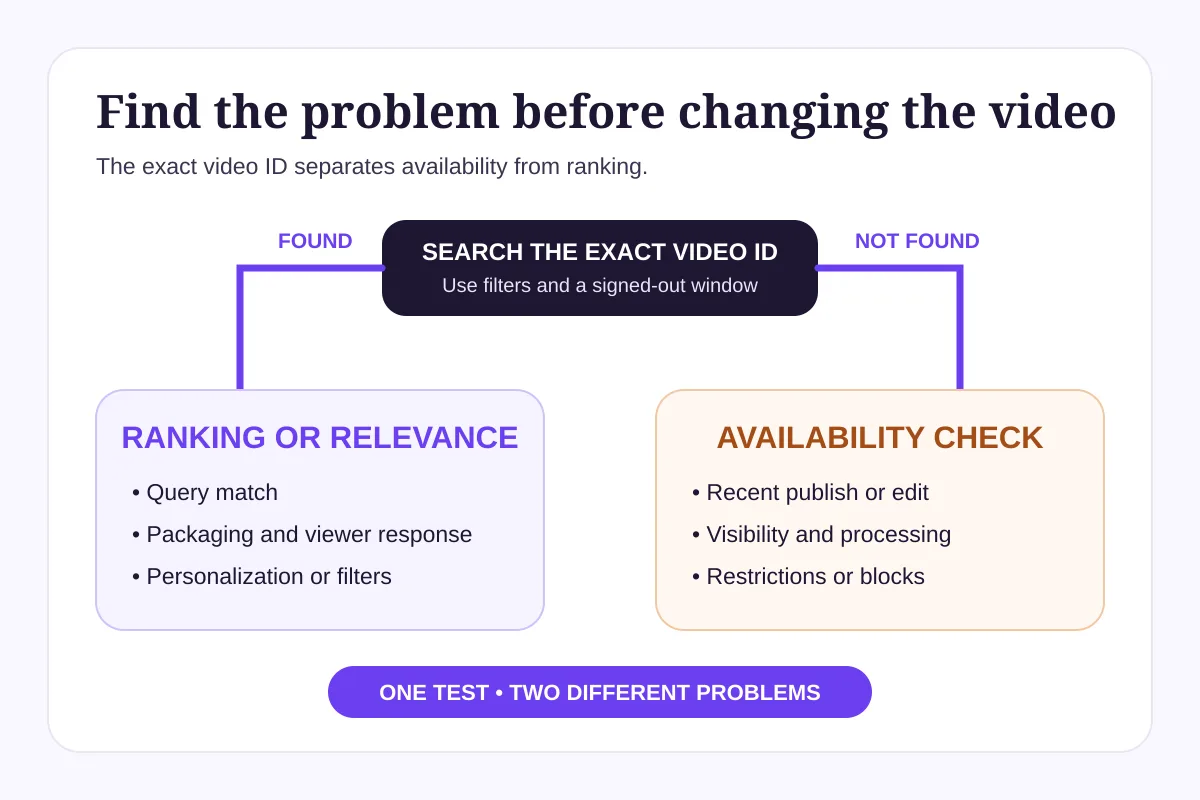
If a new or recently edited YouTube video does not appear when you search its title, do not delete and upload it again yet. YouTube says changes can take a few days to appear in search. Start by searching the exact video ID and using search filters. That first test tells you whether the video is missing from the index or simply ranking below other results.
A published video can be available by direct link before it becomes easy to find by a title query.
## Quick diagnosis
Use this split before changing anything:
- **The exact video ID returns your video:** the upload is available. The problem is more likely query relevance, ranking, personalization, or a viewer-side filter.
- **The exact video ID does not return your video:** check processing, visibility, restrictions, and recent changes before treating it as a ranking problem.
- **The direct URL works for you but not for another viewer:** inspect privacy, age, copyright, regional, and Restricted Mode limitations.
YouTube search does not work like a channel archive sorted by upload time or total views. Its official explanation says results are shaped by relevance, engagement, and quality. A public video can therefore be indexed and still sit far below more relevant results for a broad query.
The exact video ID is the fastest way to separate availability from ranking.
## Check 1: Allow time after publishing or editing
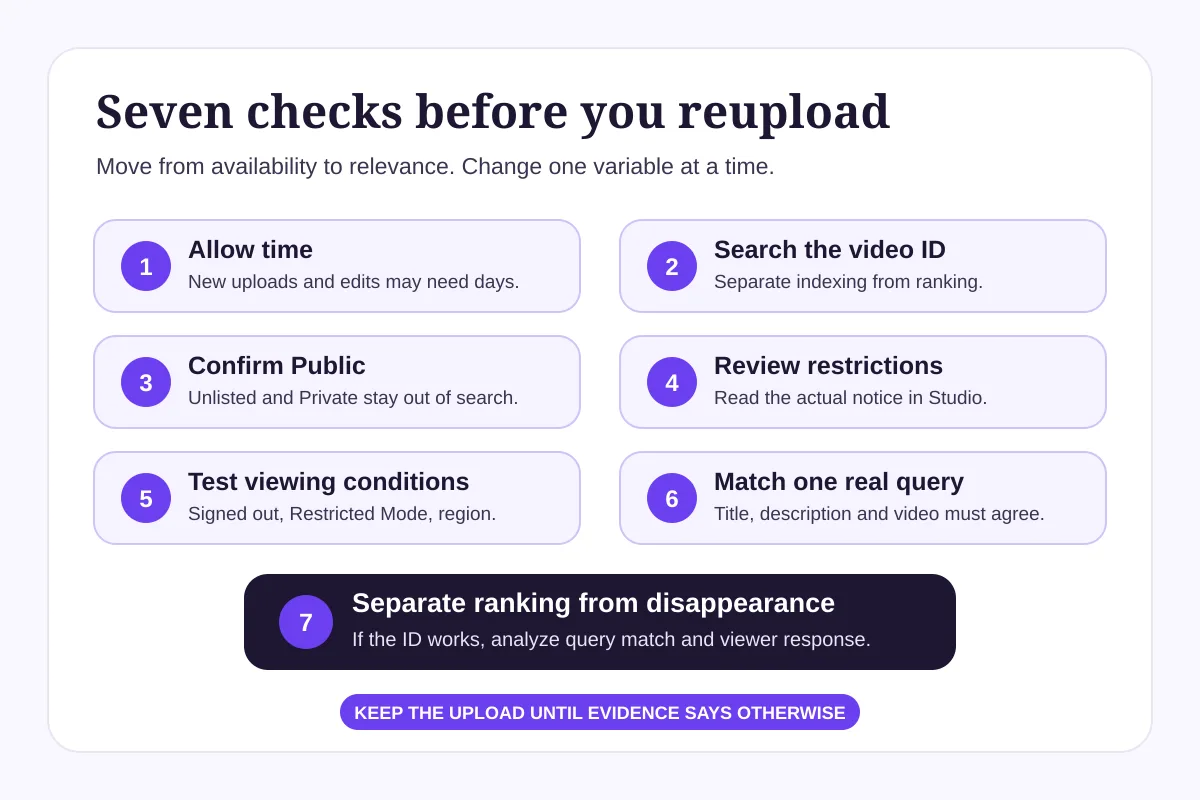
YouTube says a new upload, an updated video, or a recent channel-name or handle change may take a few days to appear correctly in search. Repeatedly editing the title during that window can make your own test harder to interpret because you are no longer checking one stable version.
Write down the publish time and the time of your last title, description, privacy, or channel-name change. Then leave the core metadata stable while you complete the remaining checks.
This is especially important when the direct link already works and YouTube Studio shows the video as public. In that situation, a short delay is more plausible than a broken upload.
## Check 2: Search the exact video ID, then use filters
Copy the characters after `watch?v=` in the video URL and search that exact ID on YouTube. YouTube recommends this test in its own troubleshooting guidance.
If the ID finds the video, the video exists in search. A title search may still fail because your query is broad, another result is more relevant, or your personal search history changes the order. Test again in a signed-out window and apply filters such as upload date or type. These tests reduce noise; they do not guarantee a particular position.
If the ID still finds nothing after a few days, continue with visibility and restriction checks. Do not jump straight to keyword changes.
## Check 3: Confirm the video is actually public
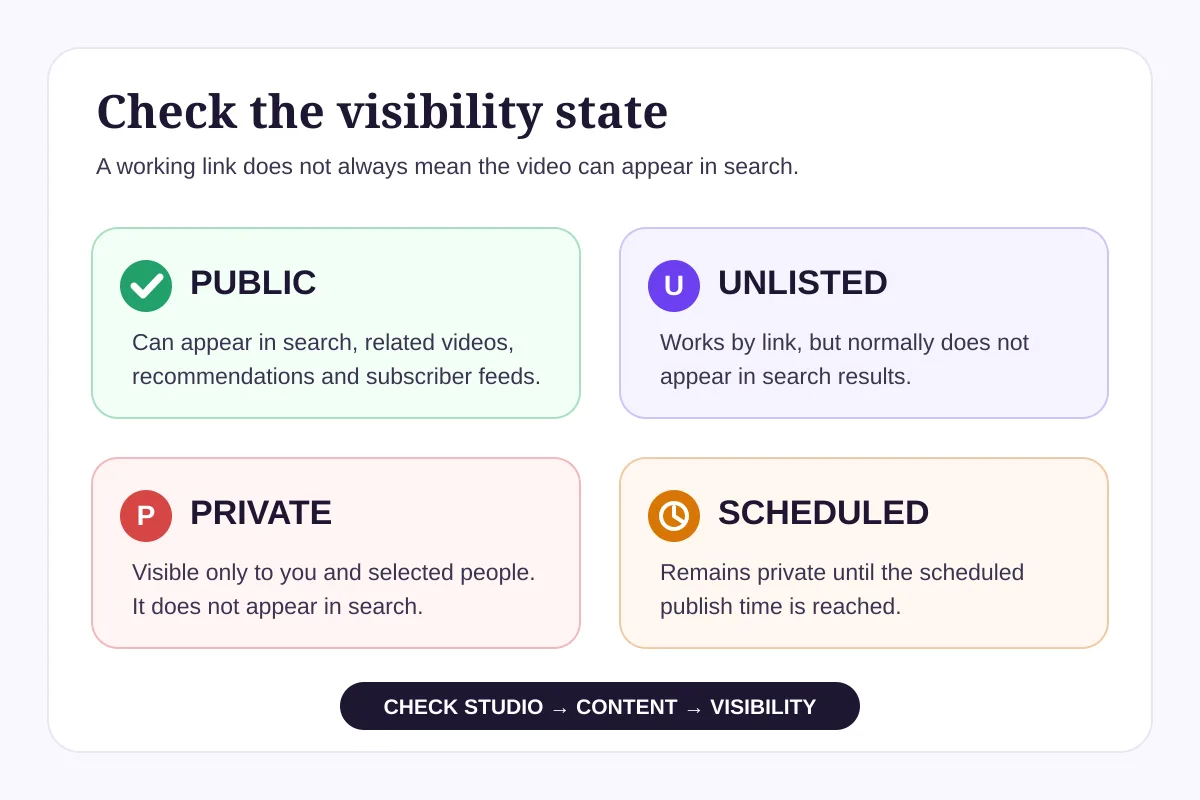
Open YouTube Studio, select **Content**, find the video, and review the **Visibility** column.
YouTube's current privacy guide is clear:
- **Public** videos can appear in search, related videos, recommendations, and the subscriber feed.
- **Unlisted** videos do not normally appear in search, although an unlisted video placed in a public playlist can be an exception.
- **Private** videos do not appear in search.
- **Scheduled** videos remain private until their scheduled publish time.
A creator can mistake a working share link for public visibility. An unlisted video opens for anyone who has the link, but that does not make it discoverable in normal search.
A working direct link does not prove that the video is public and eligible to appear in search.
## Check 4: Review Studio notices and restrictions
In YouTube Studio, inspect both the **Restrictions** column and any notices attached to the video. YouTube says restrictions can prevent viewers from watching a video or can limit where it is available.
Look for:
- an age restriction;
- a copyright claim or block;
- a Community Guidelines action;
- a made-for-kids setting that changes available features;
- a global or country-specific block;
- incomplete processing or an upload error.
Not every copyright claim hides a video. A rights holder may monetize, track, or block claimed content, and a block can apply worldwide or only in specific countries. Read the actual notice instead of assuming that the word “copyright” explains every search problem.
If YouTube offers a review or dispute path, use it only when you can accurately support the request. Changing the title will not remove a rights or policy restriction.
## Check 5: Test the viewing conditions
Search results can differ between viewers. Run a small, controlled test:
1. Open the direct video URL while signed out.
2. Search the exact video ID while signed out.
3. Check whether Restricted Mode is enabled.
4. If your audience spans countries, ask one trusted person in another relevant region to open the direct URL.
Age-restricted videos are unavailable to signed-out viewers and people under 18. Restricted Mode can also filter videos that remain available in the standard YouTube experience. Copyright blocks may vary by country.
This check is diagnostic, not a recommendation to bypass a restriction. It shows whether the video is missing for everyone or only under particular viewing conditions.
## Check 6: Match one real query naturally
When the video is public, unrestricted, and findable by ID, review the query itself. YouTube says search considers how well the title, description, and video content match the viewer's query. It also looks at engagement for that query and quality signals.
Choose one phrase that accurately describes the question answered in the video. Put the clearest version in the title, support it naturally in the description, and make sure the spoken or on-screen content actually delivers that promise.
Avoid three common reactions:
- **Stuffing tags:** YouTube says tags are mainly useful for common misspellings and otherwise play a minimal discovery role.
- **Writing a title for the algorithm:** an awkward title can weaken viewer understanding and response.
- **Targeting a query the video does not answer:** metadata cannot repair an intent mismatch inside the video.
For example, a video titled “My Editing Workflow” may be too vague for a search such as “how to edit interview audio.” If the video genuinely teaches that process, a clearer title can help YouTube and viewers understand the match. If it does not, changing the title would create a misleading promise.
## Check 7: Separate ranking from disappearance
If the video appears for its ID but not for a broad phrase, it has not disappeared. It is competing for that phrase.
Review YouTube Analytics for traffic from YouTube Search, the specific search terms available to you, impressions, click-through rate in context, and audience retention. Search ranking is query-specific, so a video can perform well for a precise question and remain invisible for a broad one.
Packaging still matters. A title and thumbnail help the right viewer choose the result. The video then needs to satisfy the promise. YouTube's performance guidance says changing a title or thumbnail can affect performance because viewers respond differently to the new packaging, not because the edit automatically resets the ranking system.
Work from availability to relevance so you do not treat every symptom as a keyword problem.
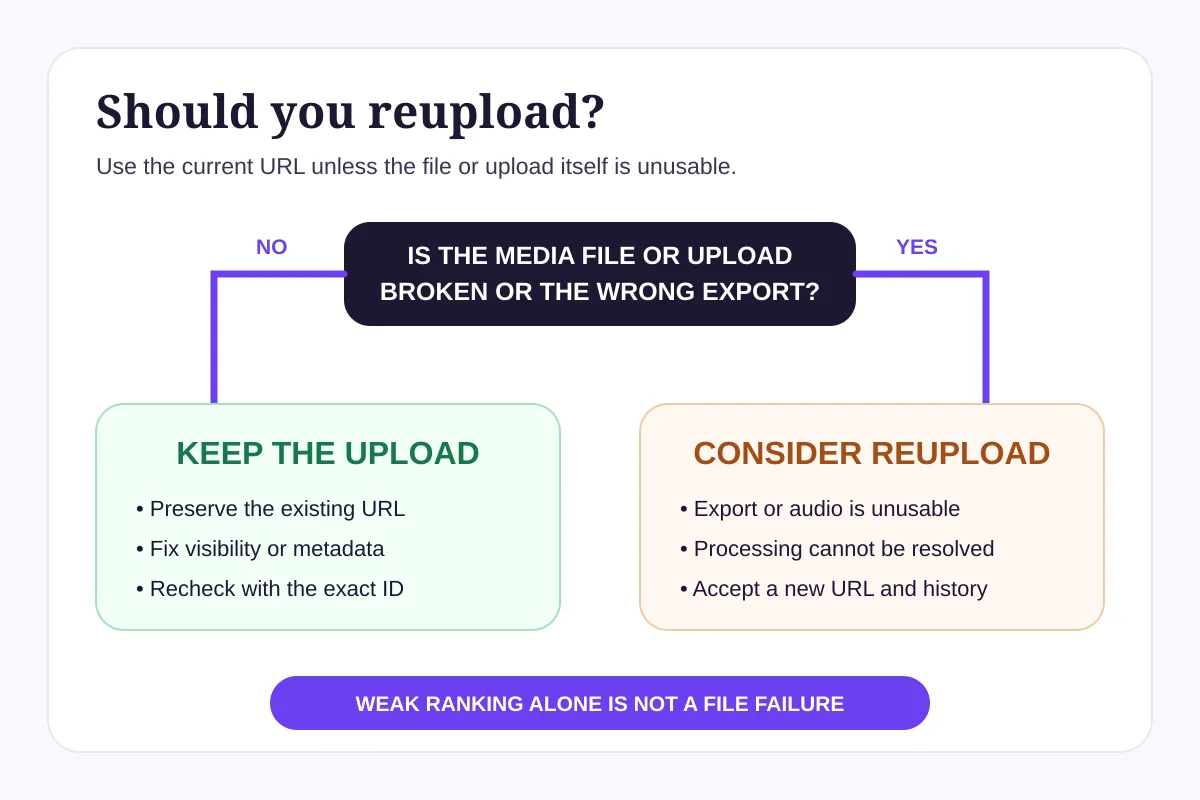
## When should you reupload?
Reupload only when the actual media file or upload is unusable—for example, the wrong export was published, the audio is corrupt, or processing failed and cannot be resolved. YouTube says an uploaded video cannot be replaced. Every new upload receives a new URL.
That matters because deleting and reuploading breaks existing links and separates the new upload from the original video's page-level history. You can edit the existing title, description, privacy settings, and some video elements without creating a new URL.
If the current upload works, keep it and fix the specific issue you found. Reuploading an indexed, public video merely because it ranks poorly replaces a search problem with a new URL and another indexing wait.
Reupload for an unusable file or failed upload, not as a first response to weak search ranking.
## A hypothetical example
Imagine a hypothetical cooking channel publishes “Three Better Weeknight Sauces.” The direct URL works, but the video does not appear for “easy pasta sauce” on the first day.
The creator searches the exact video ID and finds the upload. Studio shows **Public** with no restrictions. This rules out a missing upload and points toward query relevance and ranking. The creator leaves the video online, waits for search systems to catch up, and reviews whether the title and the actual recipe content match the intended query.
This scenario is illustrative, not a benchmark or expected outcome. A real channel should use its own Studio notices and analytics.
## A seven-day recovery plan
**Day 1:** record the publish and edit times. Search the exact video ID and save the result.
**Day 2:** verify Public visibility, processing, notices, and restrictions in Studio.
**Day 3:** test the direct URL and exact ID while signed out and with Restricted Mode checked.
**Day 4:** compare the title, description, and actual video with one accurate viewer query.
**Day 5:** inspect Search traffic terms, impressions, click-through rate, and retention in context.
**Day 6:** make one justified packaging change if the promise is unclear. Avoid changing several variables at once.
**Day 7:** repeat the exact ID and filtered-title tests. Keep the upload unless you have identified an actual file or processing failure.
If you want help building awareness around a clear YouTube content strategy, explore [FastSocialz YouTube Growth](https://fastsocialz.com/youtube-growth). No search position, view, subscriber, or revenue outcome is guaranteed.
## Frequently asked questions
### How long does it take for a YouTube video to appear in search?
YouTube says a new or recently updated video may take a few days to appear in search. Search the exact video ID and use filters after that window before assuming the upload is missing.
### Why can I open my video by link but not find it in search?
The video may be unlisted, newly published, restricted for some viewers, or indexed but ranking below other results. A working link confirms availability at that URL; it does not prove public search visibility.
### Does changing a YouTube title reset the video?
No. YouTube says title or thumbnail changes can alter performance because viewers respond differently to the new packaging, not because the edit automatically resets the video. Recent edits may still take time to appear in search.
### Do tags make a YouTube video appear in search?
Tags are not a primary search fix. YouTube says they are mainly useful for common misspellings. Accurate titles, descriptions, video content, and viewer response are more relevant to search matching.
### Should I delete and reupload a video that is not ranking?
Usually no. YouTube says every new upload receives a new URL, so reuploading should be reserved for an unusable file or a failed upload. Diagnose visibility, restrictions, relevance, and ranking first.
## Sources and methodology
This guide was reviewed on November 6, 2026 using YouTube's official guidance on [videos missing from search](https://support.google.com/youtube/answer/58097), [how YouTube Search works](https://support.google.com/youtube/answer/16090438), [video privacy settings](https://support.google.com/youtube/answer/157177), [content restrictions](https://support.google.com/youtubecreatorstudio/answer/9668091), and [replacing or deleting an upload](https://support.google.com/youtube/answer/55770). Current search results were reviewed to confirm the diagnostic intent. Unsupported “instant indexing” tricks and ranking guarantees were excluded.
## Final recommendation
Start with the exact video ID. If it finds the video, investigate query match and viewer response. If it does not, investigate time, visibility, processing, and restrictions.
Keep the existing upload unless the file itself is wrong or unusable. A stable diagnostic gives you evidence; a rushed reupload gives you a new URL and the same unanswered question.
## About the author
**FastSocialz Editorial Team** creates practical, source-checked guides for creators, businesses, and agencies working across major social platforms.
## Related reading
- [YouTube Impressions Up but CTR Down?](https://fastsocialz.com/blog/youtube-impressions-up-ctr-down)
- [YouTube Shorts vs Long-Form Videos](https://fastsocialz.com/blog/youtube-shorts-vs-long-form-videos)
- [YouTube Dynamic Thumbnails vs A/B Testing](https://fastsocialz.com/blog/youtube-dynamic-thumbnails-vs-ab-testing)
- [How to Add Chapters to YouTube Videos](https://fastsocialz.com/blog/youtube-video-chapters-timestamps)
---
Canonical HTML page: https://fastsocialz.com/blog/youtube-video-not-showing-in-search
## See also
- [Home](/index.md)
- [Pricing](/pricing.md)
- [How it works](/how-it-works.md)
- [Instagram growth](/instagram-growth.md)
- [TikTok growth](/tiktok-growth.md)
- [Facebook growth](/facebook-growth.md)
- [YouTube growth](/youtube-growth.md)
- [Spotify growth](/spotify-growth.md)
- [LinkedIn growth](/linkedin-growth.md)
- [About](/about.md)
- [Contact](/contact.md)
- [Affiliate](/affiliate.md)
- [Terms](/terms.md)
- [Privacy](/privacy.md)
- [Refunds](/refunds.md)
- [Site index for AI agents](/llms.txt)