# How to Use TikTok Studio Analytics: A 20-Minute Weekly Review
A focused 20-minute TikTok Studio routine for reading account trends, comparing similar posts and choosing one useful next content test.
- Published: 2026-09-23
- Author: FastSocialz Editorial Team
- Categories: TikTok Growth
- Reading time: 11 min
- Canonical: https://fastsocialz.com/blog/how-to-use-tiktok-studio-analytics
---
TikTok Studio can give you far more data than you can use in one sitting. The useful skill isn't opening every report. It's knowing which questions to ask, comparing the right posts and leaving with one clear next test.
This 20-minute review is built for creators and small teams who want a repeatable weekly habit. You’ll look at the account first, compare a small set of posts second and choose one decision last. No elaborate spreadsheet is required.
TikTok’s current Help Center describes TikTok Studio as a creation and management app that includes analytics, content-management and inspiration tools. The labels and available views can vary by account, region, device and app version, so treat the steps below as a decision framework rather than a promise that every screen will look identical.
## What this review should produce
After 20 minutes, you should have three things:
1. A short description of what changed across the account.
2. One pattern worth checking across comparable posts.
3. One content variable to test during the next publishing cycle.
That is enough. Analytics becomes unhelpful when a review creates ten theories and no decision.
## Table of contents
- [Why a weekly TikTok analytics review matters](#why-a-weekly-tiktok-analytics-review-matters)
- [Before you open TikTok Studio](#before-you-open-tiktok-studio)
- [The 20-minute TikTok Studio review](#the-20-minute-tiktok-studio-review)
- [A hypothetical weekly review](#a-hypothetical-weekly-review)
- [Troubleshooting misleading comparisons](#troubleshooting-misleading-comparisons)
- [Weekly TikTok analytics checklist](#weekly-tiktok-analytics-checklist)
- [Frequently asked questions](#frequently-asked-questions)
## Why a weekly TikTok analytics review matters
A single post can behave differently for many reasons: topic, opening frame, audience fit, length, timing, search demand, competition or simple variation in distribution. Looking at one result immediately after publishing encourages overreaction.
A weekly rhythm gives posts time to collect signals while keeping the feedback loop short enough to inform your next batch. It also makes your comparisons more consistent. Instead of asking, “Why did this one flop?” you can ask, “What changed across similar posts, and what is the smallest useful thing to test next?”
TikTok explains that its recommendation systems use several groups of signals, including user interactions, content information and user information. The relative importance of signals can differ, and no single visible metric fully explains distribution. That is why this workflow uses analytics to form a testable hypothesis—not to reverse-engineer a secret score.
If your concern is a sharp distribution change rather than a routine review, start with [TikTok Views Suddenly Dropped? 7 Checks Before You Change Strategy](/blog/tiktok-views-suddenly-dropped). That diagnostic separates an account-wide pattern from a weak comparison or a post-specific issue.
## Before you open TikTok Studio
Give yourself two minutes to define the review. This prevents the dashboard from choosing your question for you.
### Pick one date window
Use the same reporting window each week when the product allows it. A seven-day window is convenient for a weekly review, but it can be noisy if you publish infrequently. If you post only once or twice a week, a longer window may provide a more useful sample.
Write down the exact dates. “Last week” becomes ambiguous as soon as you compare notes later.
### Write down what you published
List the posts that went live during the window, then add only the context you already know:
- format or content type;
- topic or series;
- approximate length;
- opening approach;
- intended audience action;
- whether the post was promoted.
Do not add a verdict yet. “Bad hook” is an interpretation. “Opens with a product close-up before the explanation” is an observation.
### Separate paid and organic distribution
If you used TikTok Promote, flag those posts before comparing them with organic posts. Paid distribution and organic learning answer different questions. Our guide to [TikTok Promote vs organic growth](/blog/tiktok-promote-vs-organic-growth) explains why a promoted result should not be treated as a clean organic benchmark.
## The 20-minute TikTok Studio review
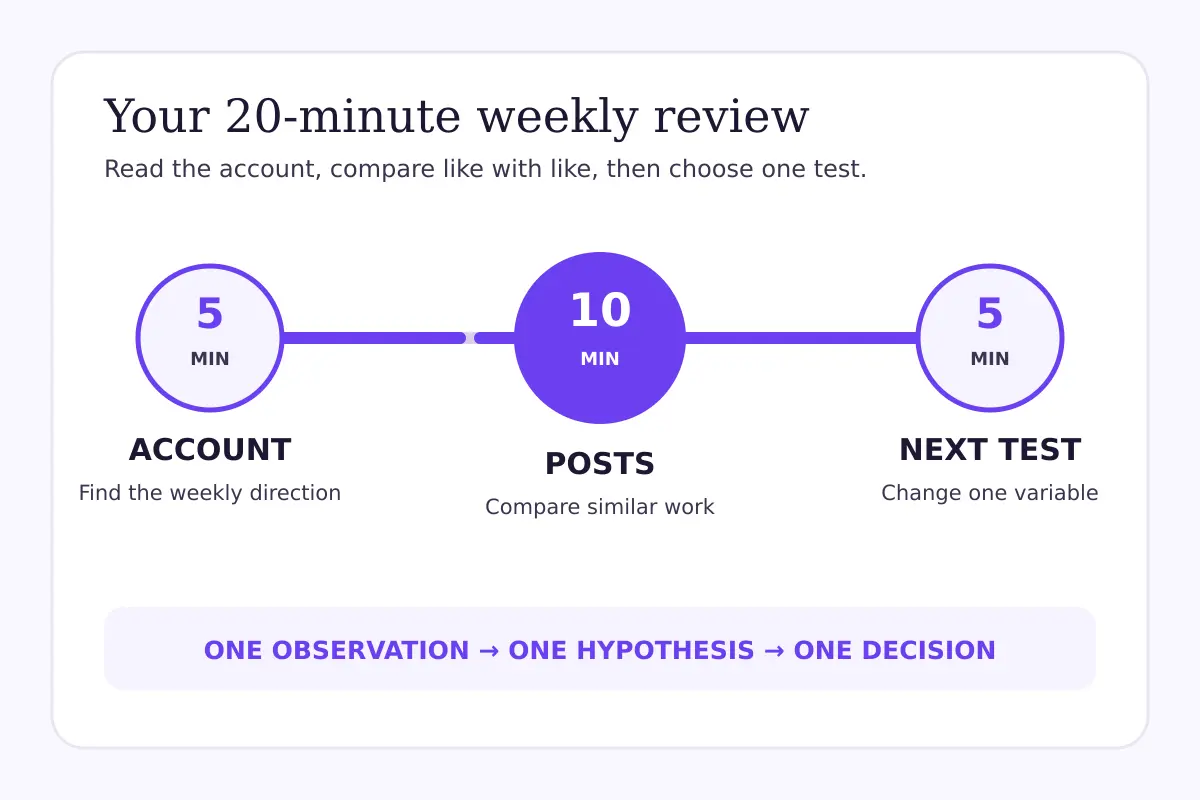
Spend five minutes on the account, ten on comparable posts and five on the next test.
### Minutes 0–5: Read the account overview
Open TikTok Studio and go to the analytics area available to your account. Start with the highest-level view for your chosen date window.
Look for direction, not drama. Ask:
- Did overall post viewing rise, fall or stay broadly stable?
- Did profile activity move in the same direction?
- Did engagement actions change with viewing, or move differently?
- Did follower growth or loss look unusual for this account?
- Was most of the change concentrated on one day or one post?
The last question matters. A strong post can lift an account-level total without telling you that every post improved. A weak week can also reflect fewer uploads rather than poorer performance per post.
Write one neutral sentence. For example: “Total viewing increased, but most of the increase came from one tutorial.” Avoid conclusions such as “the algorithm likes tutorials” at this stage.
### Minutes 5–8: Choose a fair comparison set
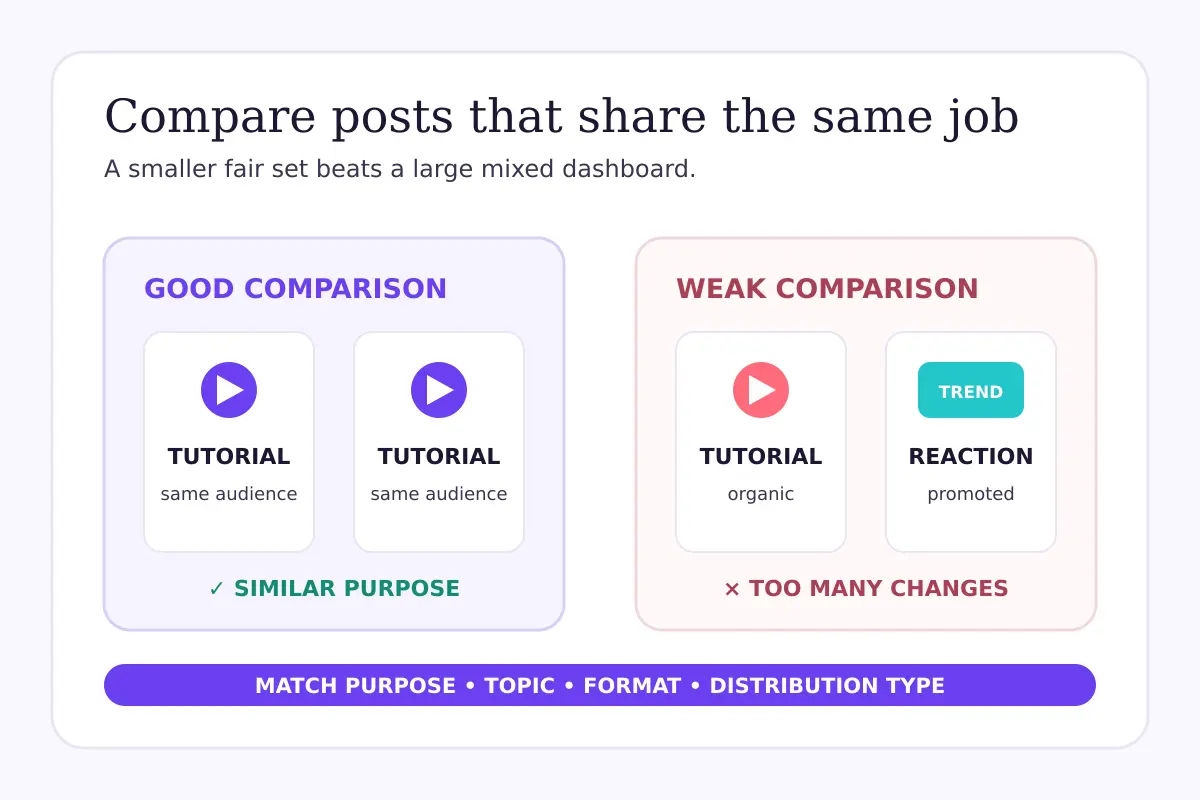
Now move from the account to individual posts. Select three to six posts that are similar enough to compare.
A useful set might contain:
- posts from the same recurring series;
- tutorials aimed at the same audience;
- videos within a similar length range;
- posts using the same goal, such as profile visits or comments;
- organic posts published under reasonably similar conditions.
Do not compare a 12-second trend reaction with a two-minute explanation and treat the difference as proof that length caused the result. You changed several variables at once.
Match posts by purpose and structure before comparing their metrics.
### Minutes 8–13: Read the post journey
For each post, read the available metrics as a sequence rather than isolated scores. Exact labels can differ, but the questions remain useful:
1. **Did people start watching?** Look at the available viewing or reach-related measures.
2. **Did they stay?** Use watch-time or retention information when TikTok provides it for that post.
3. **Did they respond?** Review likes, comments, shares, saves or other available engagement actions in context.
4. **Did they continue?** Check profile activity, follows or another relevant next action when that information is available.
These questions help you locate the weak part of the journey. A post can earn a strong initial start but lose attention early. Another can reach fewer people yet generate a comparatively useful response from those who watched.
Do not collapse all of this into one “engagement rate” unless you have defined the denominator and use it consistently. Engagement divided by views answers a different question from engagement divided by reached viewers, and the available denominator may differ by report.
### Minutes 13–15: Check audience and timing context
Use the viewer or follower information available in your version of TikTok Studio to add context—not to stereotype your audience.
You may be able to review activity times, viewer locations or follower characteristics. Ask whether the posts reached the audience you intended and whether a timing difference could have affected the comparison. Treat these panels as supporting evidence. They do not prove that a particular posting hour caused a result.
Also check whether the topic matched current audience demand. [TikTok Creator Search Insights](/blog/tiktok-creator-search-insights-content-gaps) can help you explore search topics and content gaps, but search demand is only one source of ideas. A topic still needs a useful angle and an audience fit.
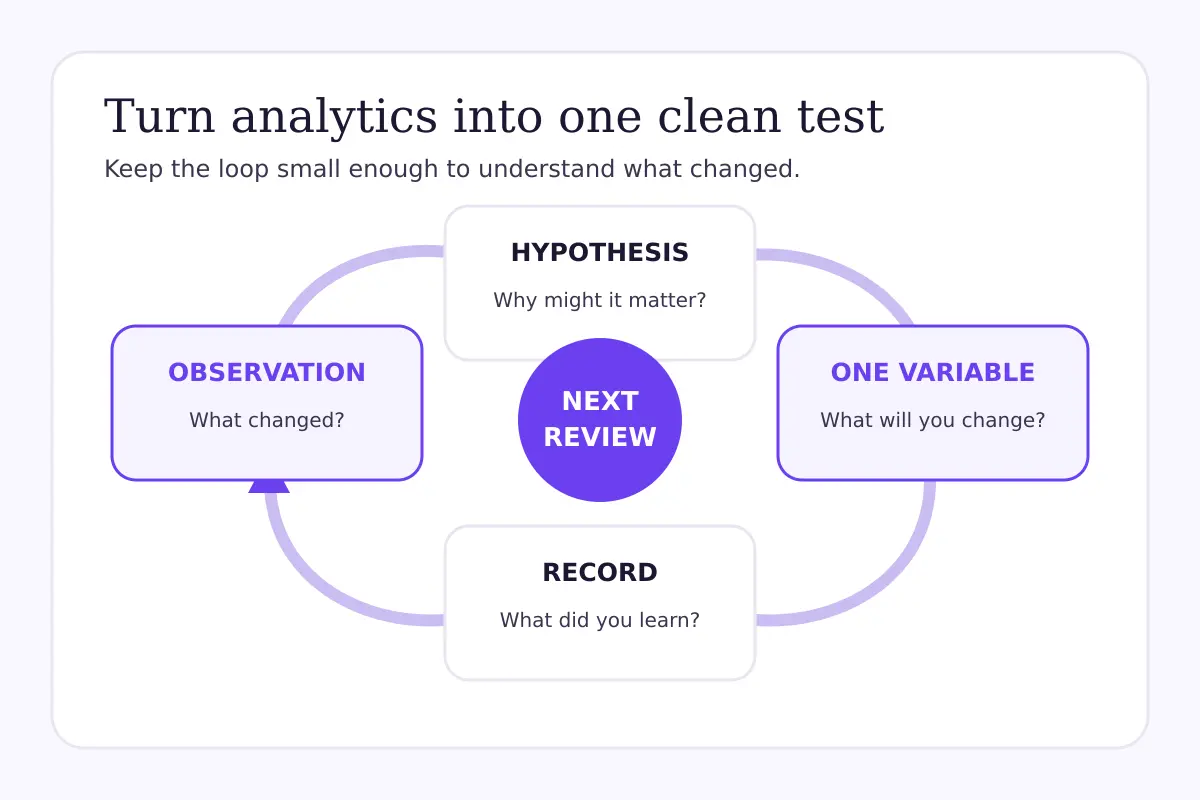
### Minutes 15–18: Turn one observation into a hypothesis
Choose the clearest repeated difference in your comparison set. Then write a hypothesis that can be wrong.
Use this sentence:
> When we change **one content variable**, we expect **one observable signal** to move because **one plausible reason**.
For example: “When the answer appears in the first spoken sentence, we expect early watch behavior to improve because viewers can confirm relevance faster.”
That is more useful than “make better hooks.” It names the change, the signal and the reasoning.
### Minutes 18–20: Design one next test
Choose one variable and keep the rest as stable as practical. Possible variables include:
- opening sentence;
- first-frame visual;
- video length range;
- amount of on-screen text;
- explanation order;
- call-to-action placement;
- topic framing.
Write down what you will compare, how many posts you need and when you will review the result. Do not promise a target outcome. The purpose of the test is to learn whether the change creates a repeatable directional difference for your account.
A small test is easier to interpret than changing your topic, hook, length and posting time at once.
## A hypothetical weekly review
**Hypothetical scenario:** A home-organization creator published four organic tutorials in seven days. Two began with a finished-room reveal; two began with a direct explanation of the problem. All four targeted similar viewers and ran for roughly the same length.
At the account level, total viewing was broadly stable. In the post comparison, the direct-explanation videos showed stronger early watch behavior, while response actions were mixed. The creator does not conclude that reveals are “dead” or that TikTok has changed its ranking system.
Instead, the creator records this hypothesis: “For problem-solving tutorials, stating the problem before the reveal may help viewers confirm relevance.” The next test keeps the topic, length range and publishing cadence similar, then varies the opening order across several posts.
This example is illustrative, not a benchmark. A different account could see the opposite pattern.
## Troubleshooting misleading comparisons
### “My best post has the most views, so I should copy it”
Views tell you that distribution occurred, not why it occurred. Check whether the post was promoted, covered an unusually timely topic or reached a different audience. Copying the surface format without understanding the job it performed can produce a false lesson.
### “One post fell, so my account is restricted”
One weak result is not enough to diagnose an account restriction. Review several comparable posts, check Account Status or any notice TikTok actually shows, and separate a content-level eligibility issue from ordinary variation. If TikTok says a post is ineligible for recommendation, follow the reason and appeal process explained in [TikTok video not eligible for the For You feed](/blog/tiktok-not-eligible-for-for-you-feed).
### “The dashboard changed, so the process no longer works”
TikTok can change labels, tabs and available metrics. Keep the questions stable even if the interface moves: What happened at the account level? Which posts are comparable? Where did the viewer journey change? What is one testable next step?
### “The numbers do not match another tool”
Check date range, time zone, update delay, metric definition and whether paid activity is included. Two tools can use different definitions or refresh schedules. Record the source and timestamp instead of forcing the numbers to match.
## Team tip: keep a one-line decision log
A team does not need a 30-slide report every week. Use one row per review:
`Date window | comparison set | observation | hypothesis | next test | review date`
This creates memory. Without it, teams repeat the same theories, change several variables at once and remember only the posts that support the latest opinion.
If you want help building a consistent growth plan around your content, explore [TikTok growth options](/tiktok-growth). The goal is a structured process focused on learning, not a fixed number of views, followers or engagements.
## Weekly TikTok analytics checklist
- [ ] Use one clearly written date window.
- [ ] Note how many posts were published.
- [ ] Separate promoted posts from organic posts.
- [ ] Summarize the account trend in one neutral sentence.
- [ ] Compare three to six genuinely similar posts.
- [ ] Read viewing, retention and response as a journey.
- [ ] Check whether one post distorted the account total.
- [ ] Write one falsifiable hypothesis.
- [ ] Change one main variable in the next test.
- [ ] Schedule the next review before closing TikTok Studio.
## Final thoughts
TikTok Studio is most useful when it shortens the distance between publishing and a better question. Spend five minutes on the account view, ten on comparable posts and five on one next test.
The result should not be a verdict on your account. It should be a clear observation, a plausible hypothesis and a small decision you can review again next week.
## Official sources
- [TikTok: TikTok Studio](https://support.tiktok.com/en/using-tiktok/creating-videos/tiktok-studio)
- [TikTok: Creator tools and analytics](https://support.tiktok.com/en/using-tiktok/creating-videos/creator-tools-on-tiktok)
- [TikTok: How TikTok recommends content](https://support.tiktok.com/en/using-tiktok/exploring-videos/how-tiktok-recommends-content)
---
Canonical HTML page: https://fastsocialz.com/blog/how-to-use-tiktok-studio-analytics
## See also
- [Home](/index.md)
- [Pricing](/pricing.md)
- [How it works](/how-it-works.md)
- [Instagram growth](/instagram-growth.md)
- [TikTok growth](/tiktok-growth.md)
- [Facebook growth](/facebook-growth.md)
- [YouTube growth](/youtube-growth.md)
- [Spotify growth](/spotify-growth.md)
- [LinkedIn growth](/linkedin-growth.md)
- [About](/about.md)
- [Contact](/contact.md)
- [Affiliate](/affiliate.md)
- [Terms](/terms.md)
- [Privacy](/privacy.md)
- [Refunds](/refunds.md)
- [Site index for AI agents](/llms.txt)